

What are Webhooks?
Webhooks allow you to receive real-time call data from Bolna as call status updates happen. When a call status changes, Bolna sends an HTTP POST request to your server with the execution data.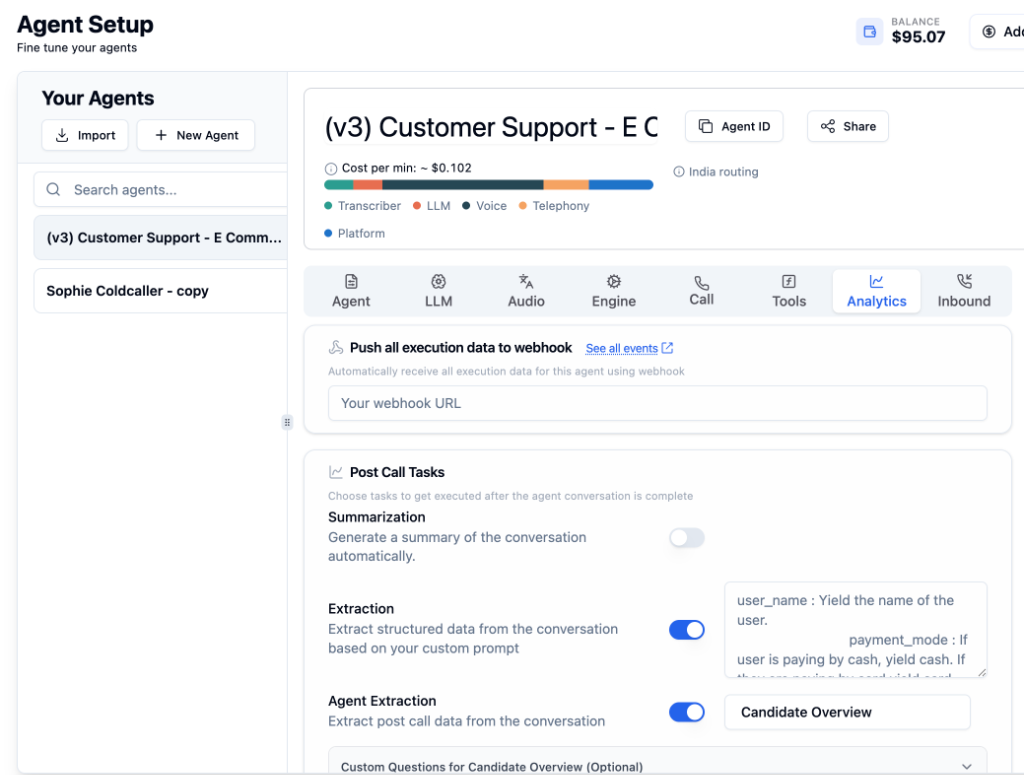
Setting Up Webhooks
Go to Analytics Tab
Open your agent and navigate to the Analytics Tab.
Enter Webhook URL
In the “Push all execution data to webhook” section, enter your webhook endpoint URL.
IP Whitelist
Webhooks are sent from the following IP address. Whitelist this IP on your server to ensure you receive all webhook events.
Webhook Payload
As call status updates (scheduled → queued → in-progress → completed), Bolna sends POST requests to your webhook with the current execution data.Use Cases
CRM Integration
Automatically update customer records after each call
Real-time Dashboards
Build live dashboards with call metrics and analytics
Workflow Automation
Trigger actions based on call outcomes
Data Logging
Log all call data to your preferred storage system
Call Statuses
View All Call Statuses
Learn about all valid call status types in Bolna Voice AI
Next Steps
Analytics Tab
Configure post-call extraction and summarization
Call History
View raw call data and recordings
Get Execution API
Understand the execution data structure
Batch Calling
Automate outbound calling campaigns