

1. Introduction
Why on-premise?
Deploying Voice AI infrastructure on your own server (on-premises or self-managed cloud infrastructure) instead of relying entirely on third-party SaaS solutions has several strategic, technical, and operational advantages, especially for companies focused on privacy, control, and performance.Security
With an on-premises deployment, all data remains within your corporate network, ensuring enhanced security as it is not transmitted over the Internet. This setup helps in complying with strict data privacy and protection regulations.Components
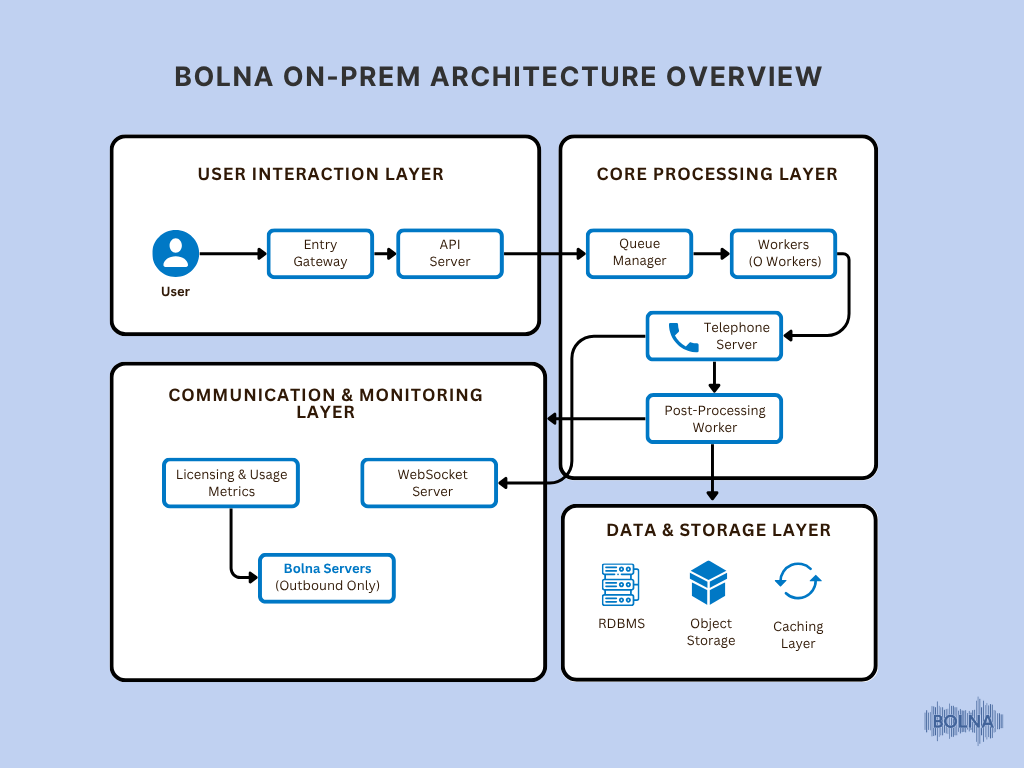
Prerequisites
Docker: Install Docker on your system to manage the containerized application.- Instance type: c6a.xlarge
- Object storage: AWS S3
- Relational Database: PostgreSQL 16.3, RAM: 8GB+
- Caching layer: Redis 7.10, 4GB RAM (Instance type: cache.t4g.medium)
- Message Queueing Channel: RabbitMQ 13.13.7, RAM: 8GB (Instance type: mq.m5.large)