

What are Dispositions?
Dispositions are LLM-powered post-call classifiers. After every call, each disposition defined for your agent runs against the transcript and produces a structured result — either a Free Text response or a Pre-defined value selected from options you configure. Use dispositions to automatically tag call outcomes, score leads, detect escalation needs, verify compliance, and more — without manually reading every transcript.Dispositions are similar to Extractions but designed for classification rather than data capture. An extraction answers “what did the customer say?”; a disposition answers “what was the outcome?”.
Key Concepts
Categories
Dispositions are organized into categories (e.g., “Lead Quality”, “Compliance”, “Call Outcome”). Every disposition belongs to exactly one category. Categories are set per-disposition via thecategory field (default: "General").
Answer Types
Each disposition must declare one or both answer types:| Type | Field | Description |
|---|---|---|
| Free Text | is_subjective: true | LLM generates a free-text response based on the transcript and question prompt |
| Pre-defined | is_objective: true | LLM selects a value from objective_options based on each option’s condition |
Subjective Types
When using Free Text (is_subjective: true), you can constrain the expected response format with subjective_type. This tells the LLM what format to produce and enables automatic post-LLM validation of the response.
| Type | Description | Example Value |
|---|---|---|
text | Any free-form text (default) | "Customer was satisfied with the demo" |
timestamp | ISO 8601 timestamp | "2026-04-08T14:30:00" |
numeric | Integer or decimal number | "42", "3.14" |
boolean | Exactly "true" or "false" | "true" |
email | Valid email address | "user@example.com" |
regex | Must match a custom regex pattern | "1234567890" (with pattern ^\d{10}$) |
subjective_type is regex, you must also provide a subjective_type_config object:
| Field | Type | Required | Description |
|---|---|---|---|
pattern | string | Yes | The regex pattern the response must match |
description | string | No | Human-readable description of the expected format |
Copy-on-Write Updates
When you update a disposition that is shared using a scopedagent_id, Bolna automatically creates a private copy for that agent instead of modifying the original. This ensures changes to one agent’s dispositions don’t affect others.
The API signals this with a 201 response (new resource created) rather than the usual 200 (updated in place). See the Update Disposition reference for full details.
Configuring Dispositions in the Dashboard
You can create and manage dispositions directly from the Analytics tab in your agent configuration.Setting the Expected Format (Subjective Type)
When creating or editing a disposition with Free Text enabled, the form shows an Expected Format dropdown. This lets you constrain the LLM’s response format without writing any API calls.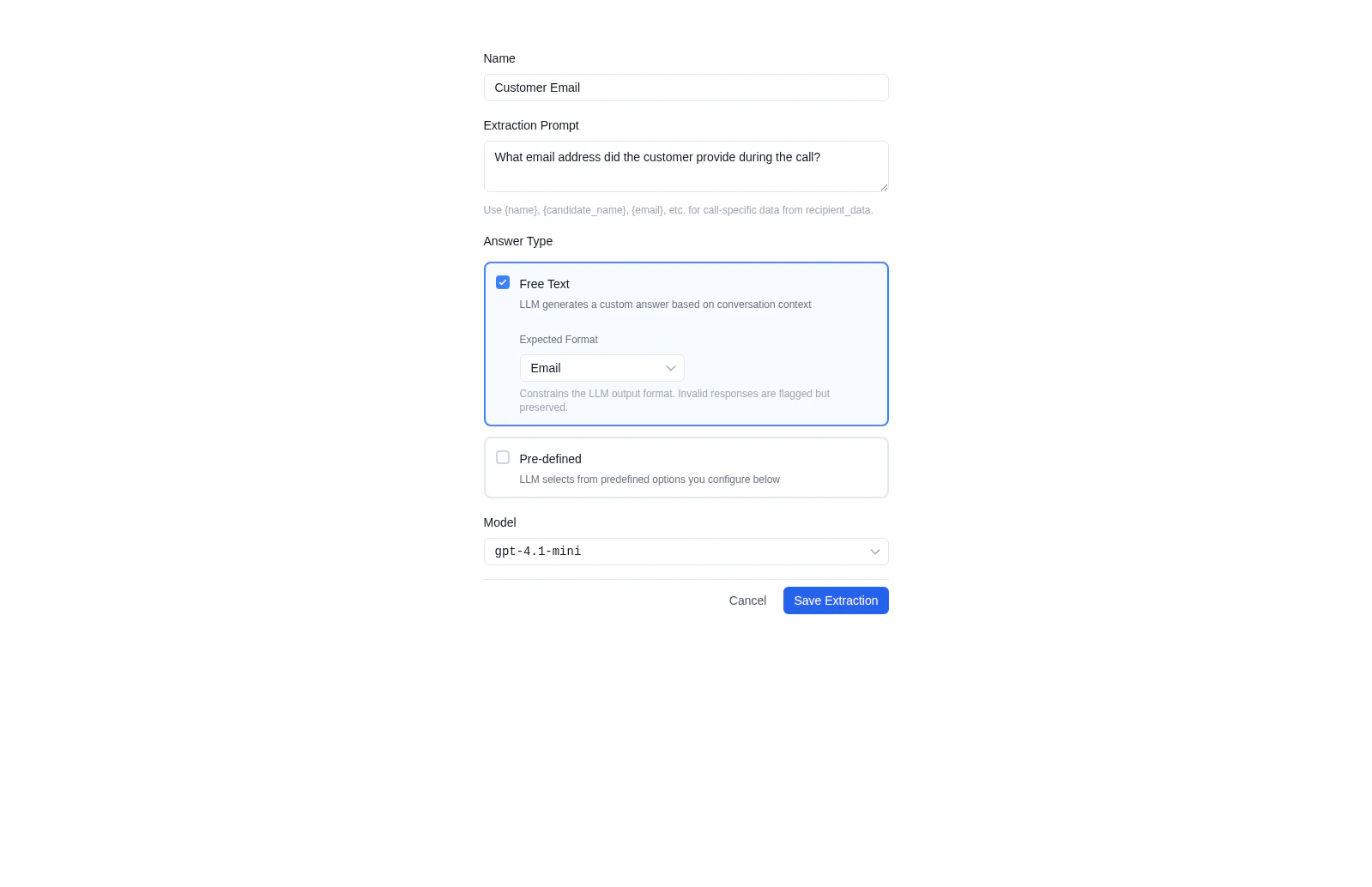
Select Expected Format
Choose from the Expected Format dropdown:
- Text (default) — Any free-form text
- Timestamp — ISO 8601 date/time
- Numeric — Integer or decimal
- Boolean —
trueorfalse - Email — Valid email address
- Custom Regex — Your own pattern
Configure Regex (if selected)
When Custom Regex is selected, two additional fields appear: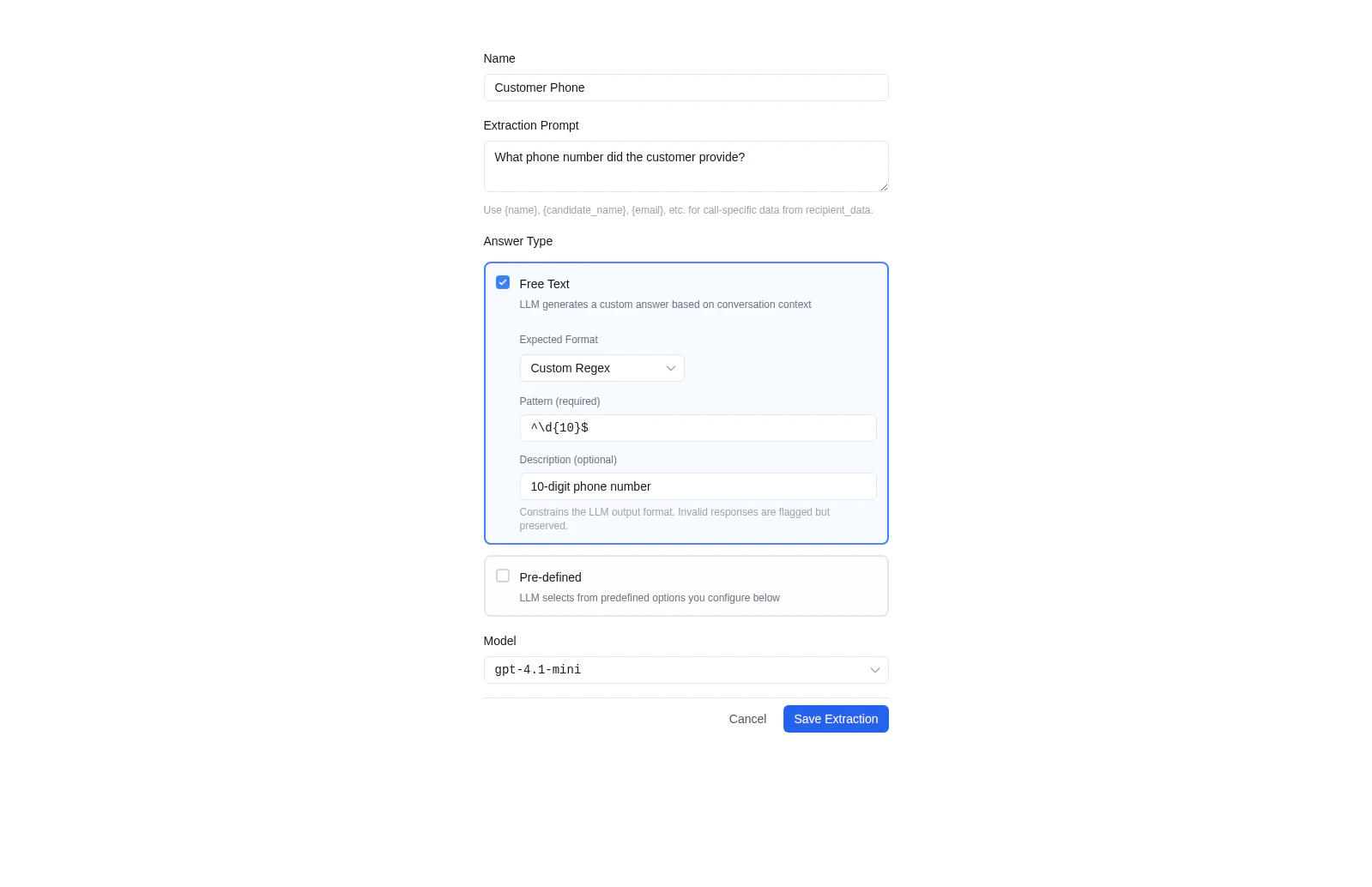
- Pattern (required) — The regex pattern the response must match (e.g.,
^\d{10}$) - Description (optional) — Human-readable explanation (e.g., “10-digit phone number”)
Invalid LLM responses are flagged but preserved — the
validation object in results will show is_valid: false, but the original response is still returned in the subjective field so no data is lost.Creating a Disposition via API
Single Disposition
With a Subjective Type Constraint
With a Regex Subjective Type
Bulk Create (for multiple dispositions at once)
Answer Types in Detail
Free Text
The LLM generates an open-ended response based on thequestion prompt and the transcript.
Best for:
- Summarizing customer concerns or objections
- Explaining the reasoning behind an outcome
- Capturing qualitative context
Typed Free Text
You can constrain the free-text response format usingsubjective_type (see Subjective Types above). When a non-text type is set, the system automatically validates the LLM’s response and includes a validation object in the result.
Example:
Pre-defined Options
The LLM selects a value from yourobjective_options list. Each option has a value (returned in the result) and a condition (instructions for when to select it).
Best for:
- Yes/No classifications
- Status labels (hot/warm/cold)
- Compliance checks
Confidence & Reasoning
Every disposition result now includes a confidence score and reasoning fields that explain why the LLM selected its answer.| Field | Type | Description |
|---|---|---|
confidence | float | Score from 0.0 to 1.0 indicating the LLM’s certainty |
confidence_label | string | Human-readable label: "High" (≥ 0.8), "Medium" (≥ 0.5), or "Low" (< 0.5) |
reasoning_subjective | string | null | Brief explanation of the free-text response. null if is_subjective is false |
reasoning_objective | string | null | Brief explanation of the pre-defined selection. null if is_objective is false |
Nested Options
objective_options support recursive nesting via sub_options for hierarchical classifications:
Managing Dispositions
List Dispositions for an Agent
Update a Disposition
agent_id in the request body to use scoped (copy-on-write) mode:
Delete a Disposition
Disposition Output Format
After each call, disposition results are stored in the execution record under thedispositions key, organized by category:
Field Reference
| Field | Type | Description |
|---|---|---|
subjective | string | null | Free Text LLM response. "" if no relevant information found; null if not configured (is_subjective: false) |
objective | string | null | Selected Pre-defined value. null if objective_options not configured or no condition matched |
confidence | float | LLM confidence score from 0.0 to 1.0 |
confidence_label | string | "High" (≥ 0.8), "Medium" (≥ 0.5), or "Low" (< 0.5) |
reasoning_subjective | string | null | LLM’s reasoning for the free-text response. null if is_subjective is false |
reasoning_objective | string | null | LLM’s reasoning for the pre-defined selection. null if is_objective is false |
validation | object | null | Post-LLM validation result for typed subjective responses. null for text type or when is_subjective is false |
Accessing Disposition Results
Via the Executions API
Via the Executions API
Fetch any execution by ID to see its disposition results:The
dispositions key is included in the execution response alongside transcript, extracted_data, and other post-call data.Via Webhooks
Via Webhooks
If you’ve configured a post-call webhook, disposition results are included in the same execution payload delivered to your endpoint after every call.See Webhooks for payload details.
Via the Dashboard
Via the Dashboard
Open any call record from the Call History tab to view disposition results alongside the transcript and call summary.
Common Use Cases
| Use Case | Disposition | Type | Subjective Type |
|---|---|---|---|
| Lead scoring | Hot / warm / cold classification | Pre-defined | — |
| Escalation detection | Agent handover requested? | Pre-defined (Yes/No) | — |
| Appointment tracking | When is the next appointment? | Free Text | timestamp |
| Cancellation analysis | Why did the customer cancel? | Free Text | text |
| Compliance auditing | Was the required disclaimer read? | Pre-defined (Yes/No) | — |
| Contact capture | What email did the customer give? | Free Text | email |
| NPS scoring | What NPS score did the customer give? | Free Text | numeric |
| Phone validation | Capture a 10-digit phone number | Free Text | regex |
| Opt-in confirmation | Did the customer agree to marketing? | Free Text | boolean |
Best Practices
- One concern per disposition — Keep each disposition focused on a single question. Split “was the customer satisfied AND did they agree to a follow-up?” into two separate dispositions.
- Write clear conditions — Objective option conditions should be mutually exclusive and cover all expected outcomes (including an “unknown” fallback if needed).
- Use both types together — Enabling both Free Text (
is_subjective) and Pre-defined (is_objective) gives you a structured label for automation plus a human-readable explanation for review. - Use categories to group related dispositions — Group escalation, compliance, and lead quality into their own categories to keep execution results readable.
- Scope updates with
agent_id— Always passagent_idwhen updating dispositions via the API to avoid unintentionally modifying a shared disposition. - Use subjective types for structured data — When you need a specific format (date, number, email), set
subjective_typeinstead of relying on prompt engineering alone. The system validates responses automatically. - Monitor confidence scores — Use
confidence_labelto flag low-confidence results for manual review or re-processing. - Use reasoning for auditing — The
reasoning_subjectiveandreasoning_objectivefields explain why the LLM chose its answer — use these for compliance audits or debugging unexpected results.
Next Steps
Dispositions API
Manage dispositions programmatically
Using Extractions
Capture structured data fields from calls
Webhooks
Receive disposition results in real-time
Executions API
Fetch disposition results from past calls