> ## Documentation Index
> Fetch the complete documentation index at: https://www.bolna.ai/docs/llms.txt
> Use this file to discover all available pages before exploring further.
# Variables
> Use {variable} tokens in node prompts, the welcome message, and edge conditions — then set values in the variables panel.
Variables are `{name}` tokens you embed in node prompts, the welcome message, or edge conditions. At call time, the platform substitutes real values from `context_data` (the data passed when the call was created or filled in by inline data extraction). In the editor, the Variables panel lets you set test values so the validation and test features use realistic content.
***
## Using variables in content
Place a `{variable_name}` token anywhere in a node prompt, the welcome message, or an edge condition. The token is replaced at runtime with the corresponding value from `context_data`.
**Welcome message:**
```
Hi {customer_name}, thanks for calling. How can I help you today?
```
**Node prompt:**
```
The customer's order ID is {order_id}. Look up the order status and read it back.
```
**Edge condition (Intent):**
```
Customer confirms the order {order_id} should be cancelled
```
Variables in expression conditions (Rule edges) reference context variables by name without braces. The braces syntax `{name}` is only for text substitution in prompts and messages.
***
## The Variables panel
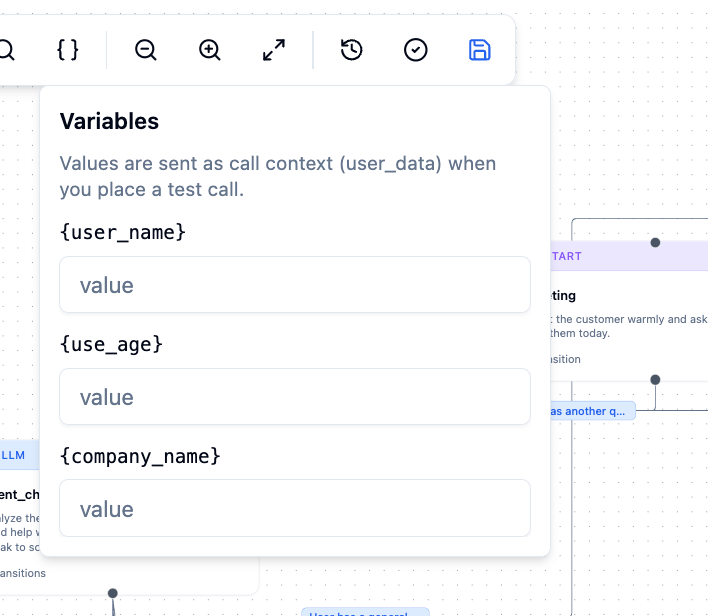 Click **Variables** in the toolbar to open the variables panel. The panel automatically discovers every `{variable_name}` token in:
* All node prompts
* Node examples (multilingual)
* Edge condition text
* Edge parameters
* The welcome message
Each discovered variable appears as a labelled input field. Set any values you want to use during validation checks and test runs.
Values set in the variables panel are saved locally per agent (they don't affect the saved agent payload). They persist across editor sessions in your browser.
### Expression variable types
The Variables panel also shows a second section: **Expression variable types**. For every variable referenced in a Rule (Expression) transition condition, you can declare its type — `string`, `number`, `boolean`, or `auto`. Declared types coerce the value before condition evaluation. Undeclared variables use automatic type inference.
This section only appears when your graph has at least one Expression transition.
***
## Built-in variables
These variables are populated automatically by the platform at call time. You don't need to pass them in `context_data`. They are available in expression conditions and can be referenced in prompts.
| Variable | When to use in prompts |
| -------------------------------- | --------------------------------------------------- |
| `recipient_data.current_hour` | Telling the agent the current hour |
| `recipient_data.current_minute` | Referencing the current minute |
| `recipient_data.current_weekday` | Weekday-aware behaviour (e.g. "closed on weekends") |
| `recipient_data.current_day` | Referencing the day of the month |
| `recipient_data.current_month` | Month-aware behaviour |
| `recipient_data.current_year` | Year-aware behaviour |
| `recipient_data.current_date` | Displaying the current date to the caller |
| `recipient_data.current_time` | Displaying the current time to the caller |
| `recipient_data.timezone` | Informing timezone-aware behaviour |
| `recipient_data.user_number` | Referencing the caller's phone number |
| `detected_language` | Switching language or tone mid-call |
| `_node_turns` | Prompting retry escalation logic |
| `_total_turns` | Prompt context about conversation length |
See [Edges & routing](/graph-agent/edges-and-routing#built-in-variables) for the full reference including numeric types for use in expression conditions.
***
## Variables from inline data extraction
Transitions can capture values from the user's reply and store them as variables. After a transition fires and captures `order_id`, that value becomes available in downstream node prompts as `{order_id}` and in expression conditions as the variable `order_id`.
See [Inline data extraction](/graph-agent/edges-and-routing#inline-data-extraction) for how to set this up on a transition.
Click **Variables** in the toolbar to open the variables panel. The panel automatically discovers every `{variable_name}` token in:
* All node prompts
* Node examples (multilingual)
* Edge condition text
* Edge parameters
* The welcome message
Each discovered variable appears as a labelled input field. Set any values you want to use during validation checks and test runs.
Values set in the variables panel are saved locally per agent (they don't affect the saved agent payload). They persist across editor sessions in your browser.
### Expression variable types
The Variables panel also shows a second section: **Expression variable types**. For every variable referenced in a Rule (Expression) transition condition, you can declare its type — `string`, `number`, `boolean`, or `auto`. Declared types coerce the value before condition evaluation. Undeclared variables use automatic type inference.
This section only appears when your graph has at least one Expression transition.
***
## Built-in variables
These variables are populated automatically by the platform at call time. You don't need to pass them in `context_data`. They are available in expression conditions and can be referenced in prompts.
| Variable | When to use in prompts |
| -------------------------------- | --------------------------------------------------- |
| `recipient_data.current_hour` | Telling the agent the current hour |
| `recipient_data.current_minute` | Referencing the current minute |
| `recipient_data.current_weekday` | Weekday-aware behaviour (e.g. "closed on weekends") |
| `recipient_data.current_day` | Referencing the day of the month |
| `recipient_data.current_month` | Month-aware behaviour |
| `recipient_data.current_year` | Year-aware behaviour |
| `recipient_data.current_date` | Displaying the current date to the caller |
| `recipient_data.current_time` | Displaying the current time to the caller |
| `recipient_data.timezone` | Informing timezone-aware behaviour |
| `recipient_data.user_number` | Referencing the caller's phone number |
| `detected_language` | Switching language or tone mid-call |
| `_node_turns` | Prompting retry escalation logic |
| `_total_turns` | Prompt context about conversation length |
See [Edges & routing](/graph-agent/edges-and-routing#built-in-variables) for the full reference including numeric types for use in expression conditions.
***
## Variables from inline data extraction
Transitions can capture values from the user's reply and store them as variables. After a transition fires and captures `order_id`, that value becomes available in downstream node prompts as `{order_id}` and in expression conditions as the variable `order_id`.
See [Inline data extraction](/graph-agent/edges-and-routing#inline-data-extraction) for how to set this up on a transition.