> ## Documentation Index
> Fetch the complete documentation index at: https://www.bolna.ai/docs/llms.txt
> Use this file to discover all available pages before exploring further.
# Using the Graph Agent Editor
> A tour of the visual editor: canvas, inspector, toolbar, and keyboard shortcuts.
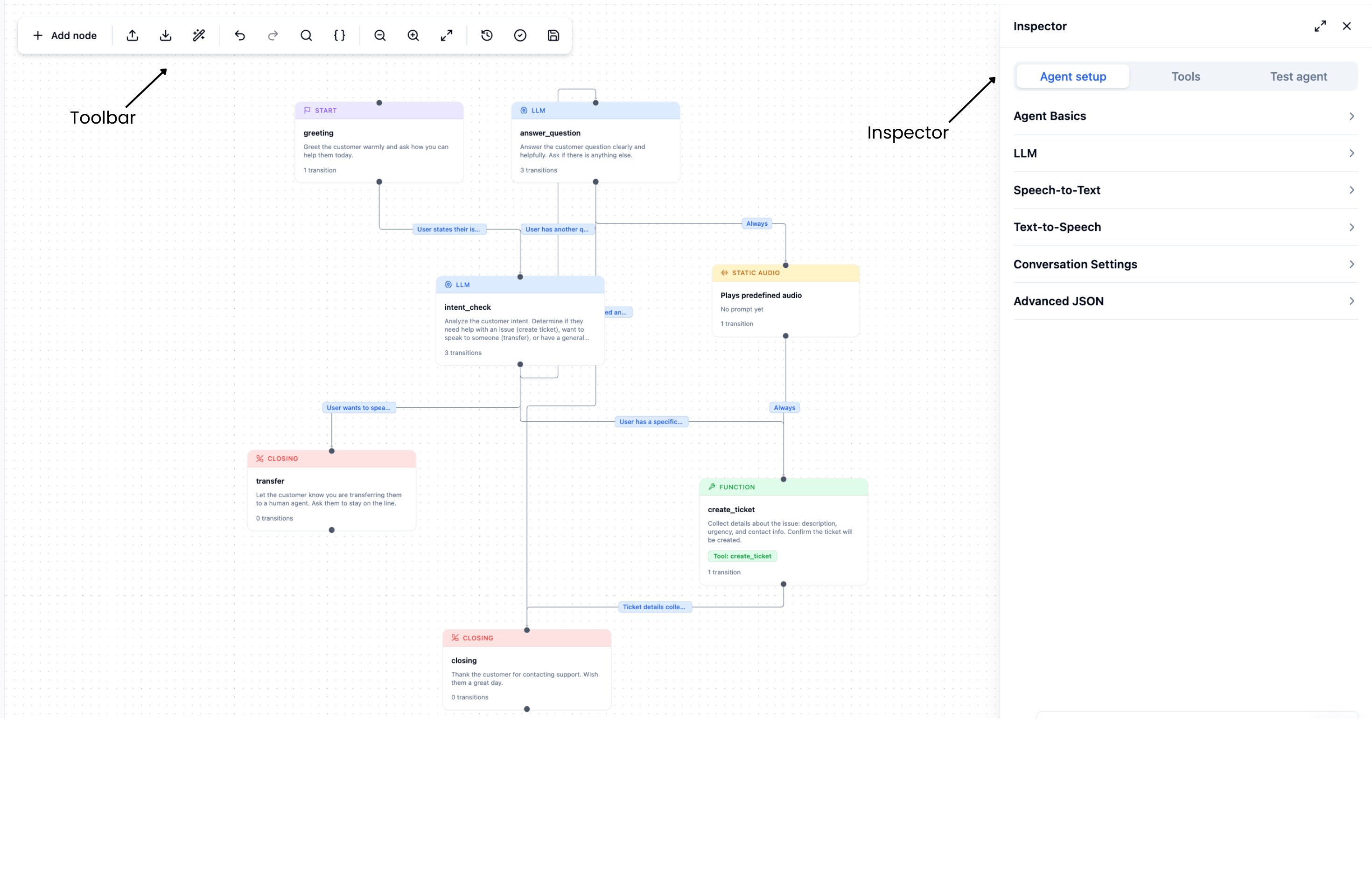
The graph agent editor is the visual builder for creating and editing graph agents in the Bolna dashboard. It has three main areas: a **canvas** in the centre, an **inspector panel** on the right, and a **toolbar** at the top.
***
## Opening the editor
Navigate to **Agents** in the dashboard, then either:
* Click **New agent** and choose **Graph agent** to create a blank agent.
* Click an existing graph agent to open it for editing.
***
## Editor layout
 ### Canvas
The canvas is the central workspace where your graph lives. Each node appears as a card; each transition appears as a directed arrow between nodes.
| Action | How |
| ----------------------------- | --------------------------------------------------------------------------------------- |
| Pan | Click and drag on any empty area |
| Zoom | Scroll wheel, or pinch on trackpad |
| Select a node | Click the node card |
| Select a transition | Click the arrow |
| Deselect | Click on any empty area |
| Create a new node | Double-click on any empty area |
| Insert a node on a transition | Click a transition arrow to select it, then click **Insert Node** in the edge inspector |
The canvas remembers node positions between sessions for each agent.
### Inspector panel
The inspector opens on the right side of the canvas. Its contents change based on what is selected:
| Selection | Inspector shows |
| ---------------------- | ------------------------------------------------------------- |
| Nothing selected | Tabs: **Agent setup**, **Tools**, **Test agent** |
| A node | Node inspector — all node fields |
| A transition (arrow) | Edge inspector — condition, type, label, priority, parameters |
| Pending new transition | Create transition form |
Click the **✕** button at the top of the inspector to close it. To reopen the inspector, click the **Inspector** button (panel-right icon) in the top-right corner of the canvas.
### Toolbar
The toolbar runs along the top of the canvas and contains all editor-level actions.
### Canvas
The canvas is the central workspace where your graph lives. Each node appears as a card; each transition appears as a directed arrow between nodes.
| Action | How |
| ----------------------------- | --------------------------------------------------------------------------------------- |
| Pan | Click and drag on any empty area |
| Zoom | Scroll wheel, or pinch on trackpad |
| Select a node | Click the node card |
| Select a transition | Click the arrow |
| Deselect | Click on any empty area |
| Create a new node | Double-click on any empty area |
| Insert a node on a transition | Click a transition arrow to select it, then click **Insert Node** in the edge inspector |
The canvas remembers node positions between sessions for each agent.
### Inspector panel
The inspector opens on the right side of the canvas. Its contents change based on what is selected:
| Selection | Inspector shows |
| ---------------------- | ------------------------------------------------------------- |
| Nothing selected | Tabs: **Agent setup**, **Tools**, **Test agent** |
| A node | Node inspector — all node fields |
| A transition (arrow) | Edge inspector — condition, type, label, priority, parameters |
| Pending new transition | Create transition form |
Click the **✕** button at the top of the inspector to close it. To reopen the inspector, click the **Inspector** button (panel-right icon) in the top-right corner of the canvas.
### Toolbar
The toolbar runs along the top of the canvas and contains all editor-level actions.
 | Button | What it does |
| ------------------- | -------------------------------------------------------------------------------------------------------- |
| **Add node** | Create a new node at the centre of the canvas. |
| **Import** | Open a JSON file or paste JSON to replace the current graph. |
| **Export** | Download the current agent as JSON, or copy to clipboard. |
| **Auto layout** | Automatically arrange all nodes using a hierarchy layout algorithm. |
| **Undo** | Undo the last change (Cmd/Ctrl+Z). |
| **Redo** | Redo an undone change (Shift+Cmd/Ctrl+Z or Ctrl+Y). |
| **Search nodes** | Filter nodes by name, prompt text, or tool name. Matching nodes are highlighted on the canvas. |
| **Variables** | Open the variables panel to set values for `{variable}` tokens. See [Variables](/graph-agent/variables). |
| **Zoom out** | Zoom the canvas out. |
| **Zoom in** | Zoom the canvas in. |
| **Fit view** | Fit all nodes into the visible canvas area. |
| **Version history** | Open the version history sheet to view and restore past saves. |
| **Validate** | Run validation and open the issues dialog. Shows a badge with the error count if issues exist. |
| **Save** | Saves the agent. The save icon changes colour when there are unsaved changes. |
***
## Keyboard shortcuts
| Shortcut | Action |
| ---------------------- | -------------- |
| `Cmd/Ctrl + Z` | Undo |
| `Shift + Cmd/Ctrl + Z` | Redo |
| `Ctrl + Y` | Redo (Windows) |
Undo snapshots are coalesced — rapid successive edits (e.g. typing in a prompt field) are grouped into a single undo step, captured after \~800ms of inactivity.
***
## Next steps
Create, edit, duplicate, and delete nodes in the canvas.
Wire nodes together with intent, rule, and always-transition edges.
Configure welcome message, LLM, voice, and conversation settings.
Find and fix errors before saving.
| Button | What it does |
| ------------------- | -------------------------------------------------------------------------------------------------------- |
| **Add node** | Create a new node at the centre of the canvas. |
| **Import** | Open a JSON file or paste JSON to replace the current graph. |
| **Export** | Download the current agent as JSON, or copy to clipboard. |
| **Auto layout** | Automatically arrange all nodes using a hierarchy layout algorithm. |
| **Undo** | Undo the last change (Cmd/Ctrl+Z). |
| **Redo** | Redo an undone change (Shift+Cmd/Ctrl+Z or Ctrl+Y). |
| **Search nodes** | Filter nodes by name, prompt text, or tool name. Matching nodes are highlighted on the canvas. |
| **Variables** | Open the variables panel to set values for `{variable}` tokens. See [Variables](/graph-agent/variables). |
| **Zoom out** | Zoom the canvas out. |
| **Zoom in** | Zoom the canvas in. |
| **Fit view** | Fit all nodes into the visible canvas area. |
| **Version history** | Open the version history sheet to view and restore past saves. |
| **Validate** | Run validation and open the issues dialog. Shows a badge with the error count if issues exist. |
| **Save** | Saves the agent. The save icon changes colour when there are unsaved changes. |
***
## Keyboard shortcuts
| Shortcut | Action |
| ---------------------- | -------------- |
| `Cmd/Ctrl + Z` | Undo |
| `Shift + Cmd/Ctrl + Z` | Redo |
| `Ctrl + Y` | Redo (Windows) |
Undo snapshots are coalesced — rapid successive edits (e.g. typing in a prompt field) are grouped into a single undo step, captured after \~800ms of inactivity.
***
## Next steps
Create, edit, duplicate, and delete nodes in the canvas.
Wire nodes together with intent, rule, and always-transition edges.
Configure welcome message, LLM, voice, and conversation settings.
Find and fix errors before saving.