> ## Documentation Index
> Fetch the complete documentation index at: https://www.bolna.ai/docs/llms.txt
> Use this file to discover all available pages before exploring further.
# Testing Your Agent
> Test your graph agent from inside the editor using chat simulation or a live call.
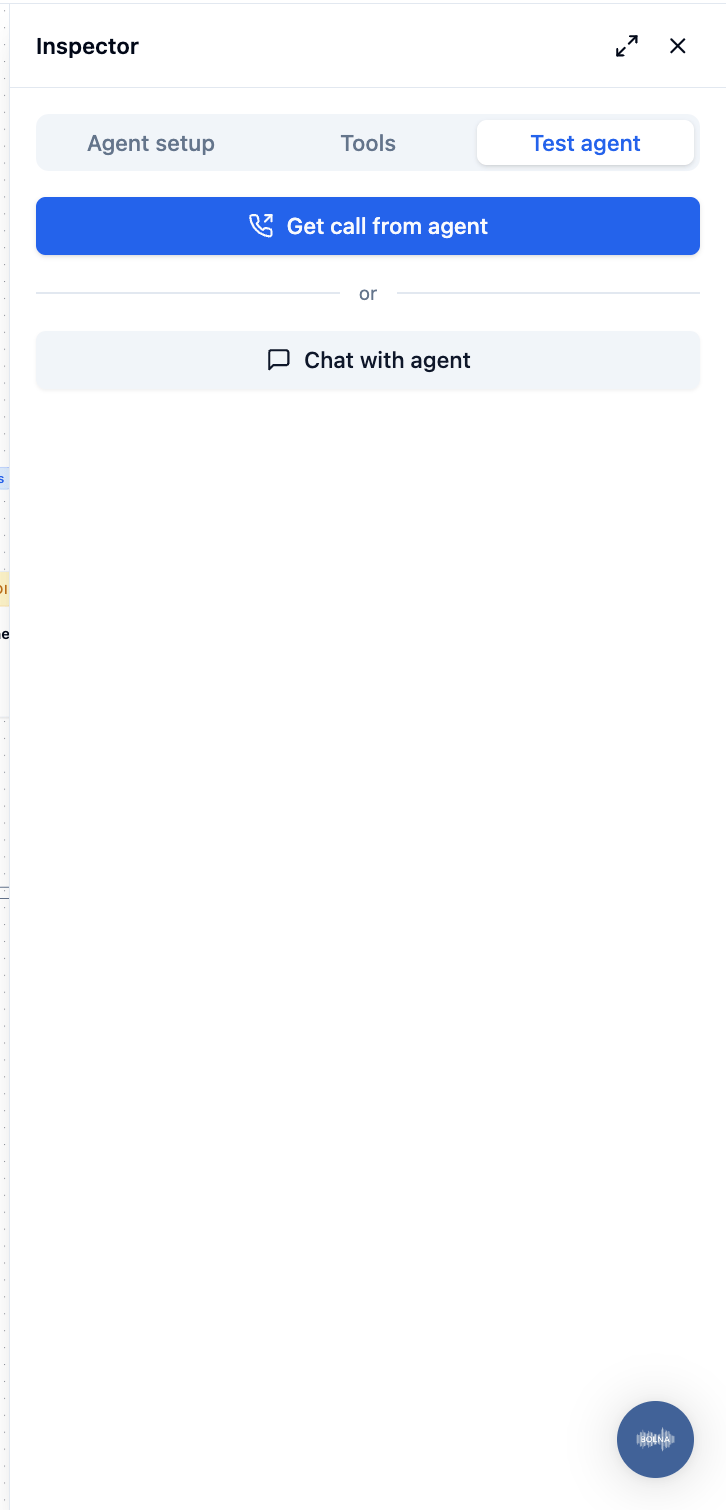
The editor has a built-in **Test agent** panel that lets you verify your agent's behaviour without leaving the builder. The panel shows two options: **Get call from agent** (real outbound call) and **Chat with agent** (text simulation, no phone needed).
***
## Opening the test panel
With nothing selected on the canvas, the inspector shows three tabs: **Agent setup**, **Tools**, and **Test agent**. Click **Test agent**.
 ***
## Chat mode
Chat mode simulates a conversation with your agent as a text exchange. This is the fastest way to verify routing logic, node transitions, and prompt behaviour.
**How to use:**
1. With nothing selected on the canvas, click the **Test agent** tab in the inspector.
2. Click **Chat with agent**.
3. Type a message and press Enter to send it.
4. The agent's response appears in the chat panel, along with which node is active.
Set variable values in the [Variables panel](/graph-agent/variables) before starting a chat test. The test uses your variable values to substitute `{tokens}` in prompts and the welcome message.
Chat mode tests the text-level logic — prompts, routing, and transitions. It does not test TTS voice quality, STT transcription accuracy, or audio latency.
***
## Call mode
Call mode initiates a real outbound call using the agent's full configuration — TTS, STT, telephony, and all.
**How to use:**
1. With nothing selected on the canvas, click the **Test agent** tab in the inspector.
2. Click **Get call from agent**, enter the phone number in E.164 format (e.g. `+919876543210`), and confirm.
3. Answer the phone. The agent runs exactly as it would in production.
Call mode makes a real phone call and consumes telephony and LLM credits. Save the agent before starting a call test so the call uses your latest changes.
***
## What to check
Use the test panel to verify:
* The welcome message sounds right with your variable values filled in.
* Routing transitions fire correctly — the agent moves to the expected node when you say what each condition describes.
* Rule (expression) transitions based on turn counts, time of day, or other built-in variables fire at the right moment.
* Static nodes play the correct message.
* Function tools are invoked on the right node.
* Silence handling (Auto-replay on silence) behaves as expected.
***
## Chat mode
Chat mode simulates a conversation with your agent as a text exchange. This is the fastest way to verify routing logic, node transitions, and prompt behaviour.
**How to use:**
1. With nothing selected on the canvas, click the **Test agent** tab in the inspector.
2. Click **Chat with agent**.
3. Type a message and press Enter to send it.
4. The agent's response appears in the chat panel, along with which node is active.
Set variable values in the [Variables panel](/graph-agent/variables) before starting a chat test. The test uses your variable values to substitute `{tokens}` in prompts and the welcome message.
Chat mode tests the text-level logic — prompts, routing, and transitions. It does not test TTS voice quality, STT transcription accuracy, or audio latency.
***
## Call mode
Call mode initiates a real outbound call using the agent's full configuration — TTS, STT, telephony, and all.
**How to use:**
1. With nothing selected on the canvas, click the **Test agent** tab in the inspector.
2. Click **Get call from agent**, enter the phone number in E.164 format (e.g. `+919876543210`), and confirm.
3. Answer the phone. The agent runs exactly as it would in production.
Call mode makes a real phone call and consumes telephony and LLM credits. Save the agent before starting a call test so the call uses your latest changes.
***
## What to check
Use the test panel to verify:
* The welcome message sounds right with your variable values filled in.
* Routing transitions fire correctly — the agent moves to the expected node when you say what each condition describes.
* Rule (expression) transitions based on turn counts, time of day, or other built-in variables fire at the right moment.
* Static nodes play the correct message.
* Function tools are invoked on the right node.
* Silence handling (Auto-replay on silence) behaves as expected.