> ## Documentation Index
> Fetch the complete documentation index at: https://www.bolna.ai/docs/llms.txt
> Use this file to discover all available pages before exploring further.
# Managing Nodes
> Create, configure, duplicate, and delete nodes in the graph agent editor.
A node is one step in your conversation. The editor gives each node a card on the canvas with a role badge, a preview of its prompt, and the number of transitions leaving it.
***
## Node types
Every node has a **node type** that controls how it responds.
| Type | What it does |
| ---------- | ------------------------------------------------------------------------------------------------------------------------ |
| **LLM** | Sends the node's prompt and conversation history to the response LLM. The LLM generates a reply. |
| **Static** | Plays a pre-cached audio clip — no LLM call, no TTS call, \~50ms latency. See [Static nodes](/graph-agent/static-nodes). |
***
## Node roles
The editor assigns each node a role based on its position and configuration. Roles are shown as a badge on the node card.
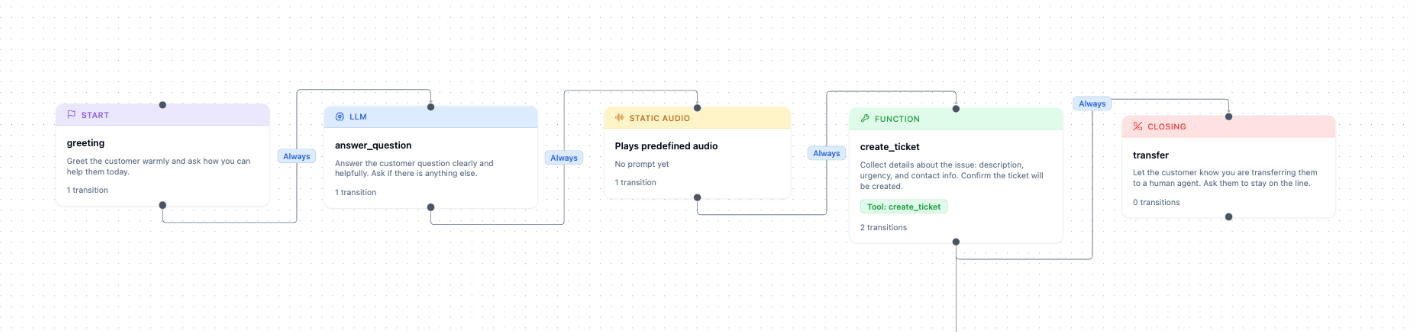 | Badge | Colour | When assigned |
| ---------------- | ------ | ------------------------------------------------------------ |
| **Start** | Purple | This node is the entry point — the first node on a new call. |
| **Closing** | Red | This node has no outgoing transitions. The call ends here. |
| **Function** | Green | LLM node with a forced `function_call` set. |
| **Static Audio** | Amber | `node_type` is `"static"`. |
| **LLM** | Blue | Standard LLM node with no special configuration. |
A node can only have one role. Precedence: Start > Closing > Function > Static > LLM.
***
## Creating a node
**Method 1 — double-click the canvas**
Double-click any empty area of the canvas. A dialog opens asking for the node type (**LLM Node** or **Static Audio Node**). Confirm to place the node at your click position.
**Method 2 — drag from a transition handle**
Click an existing node to reveal its output handle (the small circle on its bottom edge). Drag from the handle to an empty area. A new node is created and a transition from the source node is added automatically.
**Method 3 — insert on an existing transition**
Click a transition arrow to select it. In the edge inspector, click **Insert Node** and choose a node type. The new node is inserted between the source and target, with two transitions replacing the original one.
***
## Editing a node
Click any node card to select it. The **Node Inspector** opens on the right.
### Node ID
The node's unique identifier. Referenced by transitions and the start-node setting. Click the ID field to rename it.
Renaming a node updates all transitions that point to it automatically. If two nodes would end up with the same ID, a numeric suffix is added (e.g. `node_1`).
### Set as start node
Click **Make start node** to make this node the entry point for new calls. The button shows **Current start node** when this node is already the start. Only one node can be the start node at a time. The current start node shows the purple **Start** badge.
### Node type toggle
Switch between **LLM** and **Static** at the top of the node inspector. Switching to Static reveals the **Spoken message** field and hides the LLM-only fields.
### Prompt (LLM nodes)
The instruction given to the response LLM when the conversation is in this node. Write exactly what the agent should do and say at this step.
```
Collect the customer's 10-digit order number.
ASK: 'Can you please share your 10-digit order number?'
VALIDATION:
- Accept only numeric input, exactly 10 digits.
- If the customer gives fewer or more digits, ask once more.
- After 2 failed attempts, offer to transfer to a human agent.
```
### Spoken message (Static nodes)
The exact text to speak. Audio is pre-generated from this text using the agent's configured TTS voice when the agent is saved. Changing this field requires a re-save to regenerate the cache.
### Examples
Optional per-language example responses. Guides tone and phrasing without restricting the LLM. Add entries for each language code your agent supports (e.g. `en`, `hi`).
### Function call (LLM nodes)
Forces the response LLM's `tool_choice` to the selected tool when the node is entered. Use this on transfer nodes so the LLM always calls the transfer function without waiting for the user to ask.
### Knowledge base (LLM nodes)
Attach one or more knowledge bases to this node. On every turn while the conversation is on this node, the user's message is used to retrieve relevant chunks from the selected knowledge base and inject them into the LLM's context. See [Tools & RAG](/graph-agent/tools-and-rag).
### LLM overrides (LLM nodes)
Override the agent-level LLM settings for just this node.
| Field | What it overrides |
| ---------------- | -------------------------------------------------------- |
| Reasoning effort | For supported models: `minimal`, `low`, `medium`, `high` |
| Model & provider | LLM provider and specific model name |
| Temperature | Response creativity (0.0–2.0) |
| Max tokens | Cap on response length |
### Auto-replay on silence
When enabled, the node replays automatically after a configurable number of seconds of user silence. The `_silence_repeats` counter increments on each replay and can be used in expression transitions to escalate (transfer, hang up). See [Static nodes](/graph-agent/static-nodes) for a full example with the expression pattern.
***
## Duplicating a node
Open the node inspector and click **Duplicate** at the top of the inspector. A copy of the node is placed on the canvas with all the same settings. The copy gets a new unique ID (original ID + `_copy` suffix or a numeric suffix).
***
## Deleting a node
Open the node inspector and click **Delete** at the top of the inspector. Deleting a node also removes all transitions that point **to** that node. Transitions that **leave** the node (its outgoing edges) are removed too.
Node deletion cannot be undone via Cmd+Z. Confirm before deleting.
***
## Transitions list
The **Transitions** section in the node inspector lists every outgoing transition from that node. It appears below the Prompt and Examples fields. Each row shows the target node and the transition type. Click a row to select the transition and open the edge inspector.
To add a new transition from the node inspector, click **Transition** at the top of the inspector.
| Badge | Colour | When assigned |
| ---------------- | ------ | ------------------------------------------------------------ |
| **Start** | Purple | This node is the entry point — the first node on a new call. |
| **Closing** | Red | This node has no outgoing transitions. The call ends here. |
| **Function** | Green | LLM node with a forced `function_call` set. |
| **Static Audio** | Amber | `node_type` is `"static"`. |
| **LLM** | Blue | Standard LLM node with no special configuration. |
A node can only have one role. Precedence: Start > Closing > Function > Static > LLM.
***
## Creating a node
**Method 1 — double-click the canvas**
Double-click any empty area of the canvas. A dialog opens asking for the node type (**LLM Node** or **Static Audio Node**). Confirm to place the node at your click position.
**Method 2 — drag from a transition handle**
Click an existing node to reveal its output handle (the small circle on its bottom edge). Drag from the handle to an empty area. A new node is created and a transition from the source node is added automatically.
**Method 3 — insert on an existing transition**
Click a transition arrow to select it. In the edge inspector, click **Insert Node** and choose a node type. The new node is inserted between the source and target, with two transitions replacing the original one.
***
## Editing a node
Click any node card to select it. The **Node Inspector** opens on the right.
### Node ID
The node's unique identifier. Referenced by transitions and the start-node setting. Click the ID field to rename it.
Renaming a node updates all transitions that point to it automatically. If two nodes would end up with the same ID, a numeric suffix is added (e.g. `node_1`).
### Set as start node
Click **Make start node** to make this node the entry point for new calls. The button shows **Current start node** when this node is already the start. Only one node can be the start node at a time. The current start node shows the purple **Start** badge.
### Node type toggle
Switch between **LLM** and **Static** at the top of the node inspector. Switching to Static reveals the **Spoken message** field and hides the LLM-only fields.
### Prompt (LLM nodes)
The instruction given to the response LLM when the conversation is in this node. Write exactly what the agent should do and say at this step.
```
Collect the customer's 10-digit order number.
ASK: 'Can you please share your 10-digit order number?'
VALIDATION:
- Accept only numeric input, exactly 10 digits.
- If the customer gives fewer or more digits, ask once more.
- After 2 failed attempts, offer to transfer to a human agent.
```
### Spoken message (Static nodes)
The exact text to speak. Audio is pre-generated from this text using the agent's configured TTS voice when the agent is saved. Changing this field requires a re-save to regenerate the cache.
### Examples
Optional per-language example responses. Guides tone and phrasing without restricting the LLM. Add entries for each language code your agent supports (e.g. `en`, `hi`).
### Function call (LLM nodes)
Forces the response LLM's `tool_choice` to the selected tool when the node is entered. Use this on transfer nodes so the LLM always calls the transfer function without waiting for the user to ask.
### Knowledge base (LLM nodes)
Attach one or more knowledge bases to this node. On every turn while the conversation is on this node, the user's message is used to retrieve relevant chunks from the selected knowledge base and inject them into the LLM's context. See [Tools & RAG](/graph-agent/tools-and-rag).
### LLM overrides (LLM nodes)
Override the agent-level LLM settings for just this node.
| Field | What it overrides |
| ---------------- | -------------------------------------------------------- |
| Reasoning effort | For supported models: `minimal`, `low`, `medium`, `high` |
| Model & provider | LLM provider and specific model name |
| Temperature | Response creativity (0.0–2.0) |
| Max tokens | Cap on response length |
### Auto-replay on silence
When enabled, the node replays automatically after a configurable number of seconds of user silence. The `_silence_repeats` counter increments on each replay and can be used in expression transitions to escalate (transfer, hang up). See [Static nodes](/graph-agent/static-nodes) for a full example with the expression pattern.
***
## Duplicating a node
Open the node inspector and click **Duplicate** at the top of the inspector. A copy of the node is placed on the canvas with all the same settings. The copy gets a new unique ID (original ID + `_copy` suffix or a numeric suffix).
***
## Deleting a node
Open the node inspector and click **Delete** at the top of the inspector. Deleting a node also removes all transitions that point **to** that node. Transitions that **leave** the node (its outgoing edges) are removed too.
Node deletion cannot be undone via Cmd+Z. Confirm before deleting.
***
## Transitions list
The **Transitions** section in the node inspector lists every outgoing transition from that node. It appears below the Prompt and Examples fields. Each row shows the target node and the transition type. Click a row to select the transition and open the edge inspector.
To add a new transition from the node inspector, click **Transition** at the top of the inspector.