> ## Documentation Index
> Fetch the complete documentation index at: https://www.bolna.ai/docs/llms.txt
> Use this file to discover all available pages before exploring further.
# Block incoming callers by number or prefix
> Step-by-step guide to reject spam or unwanted inbound calls on Bolna Voice AI agents by maintaining your own blocklist of phone numbers and prefixes using caller identification.
## Overview
Bolna lets you reject unwanted inbound calls (spam, promotional callers, specific number ranges) **before the agent answers** and before any AI or telephony usage is incurred. Instead of configuring individual numbers on Bolna, you keep the blocklist on your side and let Bolna consult it on every incoming call.
This works by combining two existing inbound features:
1. **[Caller identification](/docs/customizations/identify-incoming-callers)** — Bolna calls your API (or looks up a CSV / Google Sheet) with the caller's number before the call is answered.
2. **Allow Calls Only from Database** — a toggle in the [Inbound tab](/docs/agent-setup/inbound-tab#call-restrictions) that rejects any caller for whom no record is found.
Your API decides who gets through: return caller data for allowed numbers and an **empty result** for anything you want to block. Because the check runs in your own code, you can block single numbers, whole prefixes, or number ranges, and update the list at any time without touching Bolna.
This guide uses the **Internal API** data source because it is the only option that lets you express prefix and range rules. CSV and Google Sheet sources only support exact-match allow lists.
***
## How it works
```
Incoming call from +917947012345
│
▼
Bolna → GET https://api.your-domain.com/callers?contact_number=%2B917947012345&agent_id=...&execution_id=...
│
├── Number matches your blocklist (e.g. prefix +9179470*)
│ → your API returns an empty result
│ → "Allow Calls Only from Database" is ON, so Bolna rejects the call
│ → the agent never answers, no usage is billed
│
└── Number is allowed
→ your API returns caller data (JSON)
→ Bolna answers and injects the data into the prompt
```
***
## Step-by-step setup
Decide which callers to reject. You can mix exact numbers and prefixes. Store the list wherever is convenient for you — a config file, a database table, or an environment variable.
In this guide we block the entire `+9179470` range (written as `+9179470*`) plus one specific number:
```json theme={"system"}
{
"blocked_prefixes": ["+9179470"],
"blocked_numbers": ["+911234567890"]
}
```
Always store and compare numbers in E.164 format (`+` followed by country code and number, no spaces or dashes). This is the format Bolna sends in `contact_number`.
Create a **GET** endpoint that accepts the query parameters Bolna sends:
| Parameter | Description |
| ---------------- | -------------------------------------- |
| `contact_number` | Incoming caller's phone number (E.164) |
| `agent_id` | Agent handling the call |
| `execution_id` | Unique identifier for this call |
The endpoint must:
* Return an **empty result** (`{}`) when the number is blocked.
* Return a JSON object with caller details when the number is allowed.
* Respond within **3 seconds**.
```python Python (FastAPI) theme={"system"}
from fastapi import FastAPI, Query
app = FastAPI()
BLOCKED_PREFIXES = ["+9179470"] # blocks +9179470*
BLOCKED_NUMBERS = {"+911234567890"} # exact matches
def is_blocked(number: str) -> bool:
if number in BLOCKED_NUMBERS:
return True
return any(number.startswith(prefix) for prefix in BLOCKED_PREFIXES)
@app.get("/callers")
def identify_caller(
contact_number: str = Query(...),
agent_id: str = Query(None),
execution_id: str = Query(None),
):
if is_blocked(contact_number):
# Empty result → Bolna finds no record and rejects the call
return {}
# Allowed caller → return whatever data you want in the prompt.
# Replace this with a lookup in your CRM/database.
return {
"first_name": "Bruce",
"last_name": "Wayne",
"account_status": "premium",
}
```
```javascript Node.js (Express) theme={"system"}
const express = require("express");
const app = express();
const BLOCKED_PREFIXES = ["+9179470"]; // blocks +9179470*
const BLOCKED_NUMBERS = new Set(["+911234567890"]); // exact matches
function isBlocked(number) {
if (BLOCKED_NUMBERS.has(number)) return true;
return BLOCKED_PREFIXES.some((prefix) => number.startsWith(prefix));
}
app.get("/callers", (req, res) => {
const { contact_number } = req.query;
if (isBlocked(contact_number)) {
// Empty result → Bolna finds no record and rejects the call
return res.json({});
}
// Allowed caller → return whatever data you want in the prompt.
// Replace this with a lookup in your CRM/database.
res.json({
first_name: "Bruce",
last_name: "Wayne",
account_status: "premium",
});
});
app.listen(3000);
```
If you do **not** have caller data for allowed numbers, return any non-empty JSON object (for example `{"allowed": true}`). Only an empty result triggers the rejection.
Your API must respond within **3 seconds**. If it times out, Bolna treats the lookup as returning no data — with the restriction toggle enabled this means the call is rejected, so make sure your endpoint is fast and highly available.
In the [Bolna dashboard](https://platform.bolna.ai), open your inbound agent and go to the **Inbound** tab.
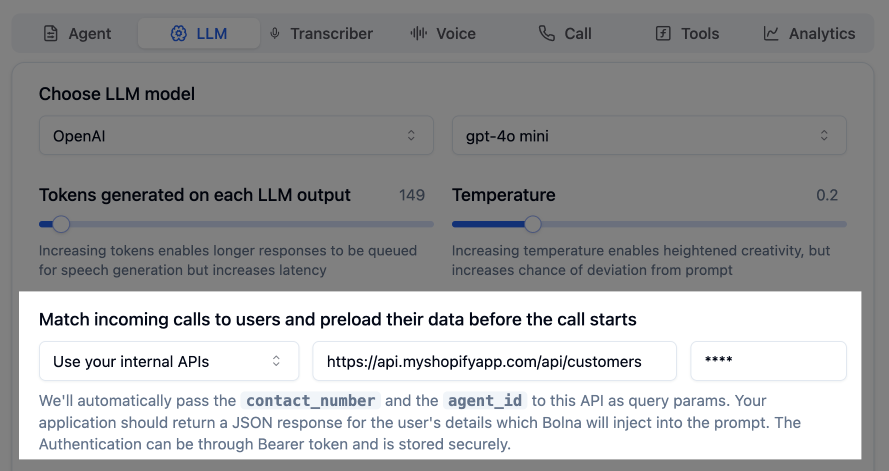
1. Under **Database Matching**, choose **"Use your internal APIs"** from the dropdown.
2. Enter your endpoint URL, for example `https://api.your-domain.com/callers`.
3. Optionally add a **Bearer token** so only Bolna can call your endpoint.
 Still in the **Inbound** tab, under **Call Restrictions**, toggle on **"Allow Calls Only from Database"**.
This is what converts an empty result into a rejected call. Without it, blocked callers would still reach the agent — just without any injected data.
Save the agent.
Verify your endpoint behaves correctly before routing live traffic:
```bash theme={"system"}
# Blocked (prefix match) → expect {}
curl "https://api.your-domain.com/callers?contact_number=%2B917947012345&agent_id=test&execution_id=test"
# Blocked (exact match) → expect {}
curl "https://api.your-domain.com/callers?contact_number=%2B911234567890&agent_id=test&execution_id=test"
# Allowed → expect caller data
curl "https://api.your-domain.com/callers?contact_number=%2B919876543210&agent_id=test&execution_id=test"
```
Then place a test call to your Bolna number from a blocked and an allowed phone. The blocked call should be rejected without the agent answering; the allowed call should connect as usual.
***
## Blocking patterns
All matching happens in your code, so any rule you can express is supported. Common patterns:
| Rule | Example | Implementation |
| --------------------- | --------------------------- | ------------------------------- |
| Single number | `+911234567890` | Exact string match |
| Prefix / number range | `+9179470*` | `number.startswith("+9179470")` |
| Entire country | `+1*` | `number.startsWith("+1")` |
| Regex | `^\+9179470\d{5}$` | Regular expression match |
| Dynamic list | numbers flagged in your CRM | Database lookup |
Because the blocklist lives on your side, you can update it instantly — add a spammer's number to your database and the very next call from them is rejected. No changes are needed on Bolna.
***
## Using this alongside an allow list
You can combine both behaviours in the same endpoint:
* **Allow list first**: if the number is a known customer, return their data.
* **Blocklist next**: if the number matches a blocked prefix, return `{}`.
* **Everyone else**: either return `{}` (strict, only known callers get through) or a minimal non-empty object like `{"known": false}` (open, unknown callers are still answered).
```python theme={"system"}
def identify_caller(contact_number: str):
customer = crm.lookup(contact_number)
if customer:
return customer # allowed, with data
if is_blocked(contact_number):
return {} # rejected
return {"known": False} # unknown but answered
```
***
## Related Features
Full reference for API, CSV and Google Sheet data sources
Call restrictions and spam prevention settings
Configure inbound calling for your agents
Still in the **Inbound** tab, under **Call Restrictions**, toggle on **"Allow Calls Only from Database"**.
This is what converts an empty result into a rejected call. Without it, blocked callers would still reach the agent — just without any injected data.
Save the agent.
Verify your endpoint behaves correctly before routing live traffic:
```bash theme={"system"}
# Blocked (prefix match) → expect {}
curl "https://api.your-domain.com/callers?contact_number=%2B917947012345&agent_id=test&execution_id=test"
# Blocked (exact match) → expect {}
curl "https://api.your-domain.com/callers?contact_number=%2B911234567890&agent_id=test&execution_id=test"
# Allowed → expect caller data
curl "https://api.your-domain.com/callers?contact_number=%2B919876543210&agent_id=test&execution_id=test"
```
Then place a test call to your Bolna number from a blocked and an allowed phone. The blocked call should be rejected without the agent answering; the allowed call should connect as usual.
***
## Blocking patterns
All matching happens in your code, so any rule you can express is supported. Common patterns:
| Rule | Example | Implementation |
| --------------------- | --------------------------- | ------------------------------- |
| Single number | `+911234567890` | Exact string match |
| Prefix / number range | `+9179470*` | `number.startswith("+9179470")` |
| Entire country | `+1*` | `number.startsWith("+1")` |
| Regex | `^\+9179470\d{5}$` | Regular expression match |
| Dynamic list | numbers flagged in your CRM | Database lookup |
Because the blocklist lives on your side, you can update it instantly — add a spammer's number to your database and the very next call from them is rejected. No changes are needed on Bolna.
***
## Using this alongside an allow list
You can combine both behaviours in the same endpoint:
* **Allow list first**: if the number is a known customer, return their data.
* **Blocklist next**: if the number matches a blocked prefix, return `{}`.
* **Everyone else**: either return `{}` (strict, only known callers get through) or a minimal non-empty object like `{"known": false}` (open, unknown callers are still answered).
```python theme={"system"}
def identify_caller(contact_number: str):
customer = crm.lookup(contact_number)
if customer:
return customer # allowed, with data
if is_blocked(contact_number):
return {} # rejected
return {"known": False} # unknown but answered
```
***
## Related Features
Full reference for API, CSV and Google Sheet data sources
Call restrictions and spam prevention settings
Configure inbound calling for your agents